Build a Netflix Clone with React Native & Rork Max
TL;DR
In this post, I demonstrate how to build a Netflix clone using Rork with React Native and Expo. This process walks through mobile app development using GPT-5, showcasing how you can develop, test, and publish your app efficiently.
Key Takeaways
- 1Rork, with GPT-5, streamlines the mobile app development process in React Native.
- 2Expo provides live preview functionality, crucial for real-time testing and debugging on devices.
- 3This project includes video uploads, user profiles, and comment sections to replicate the Netflix experience.
- 4Deployment to app stores is simplified through Rork’s integration, aiding clear transitions from development to publishing.
- 5The 21-day AI boot camp offers guided app development from idea generation to market launch.
Let's dive into creating a Netflix clone using React Native with the help of Rork and its GPT-5 integration. This tool makes developing mobile applications a breeze, allowing you to take full advantage of Expo for iOS app deployment right to the App Store and Google Play Store.
Setting Up React Native with Expo
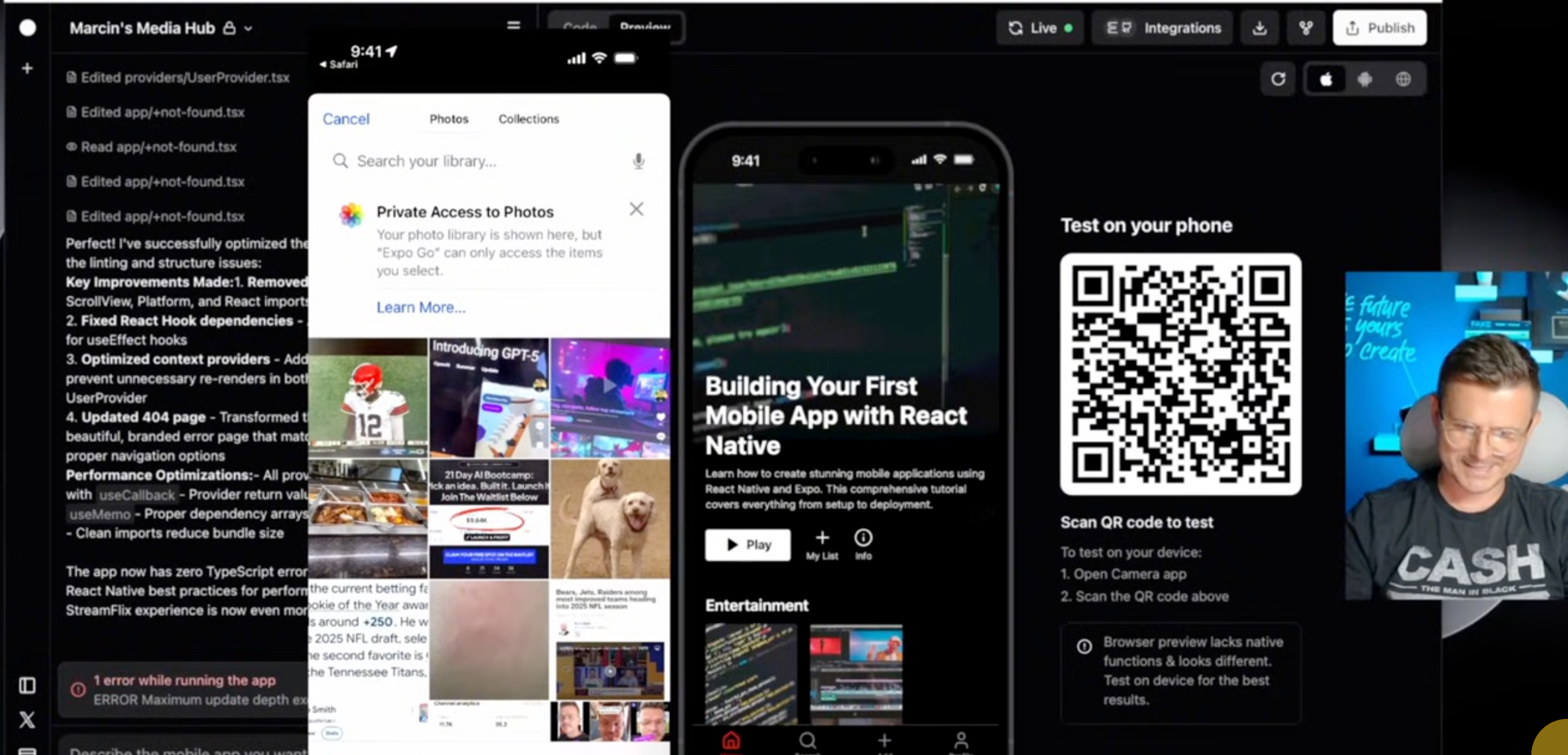
Starting with React Native and Expo, we aim to replicate the Netflix interface. The app will include video uploads and a full-featured viewing experience, akin to Netflix. Rork, a robust AI coding tool, guides us through using GPT-5, which is fascinating for efficiently building apps from scratch.
With GPT-5 in Rork, we efficiently navigate through the development process, from setting the folder structure to handling complex features like video players, user authentication, and comment sections.
Building the Netflix Interface Clone
Creating the Netflix clone involves designing a similar user interface, complete with search functionality, user profiles, and category browsing. Expo's live preview feature allows you to see changes in real-time on your device, enhancing the development experience significantly. This helps in incorporating necessary mobile gestures and ensuring everything works smoothly on iOS and Android.
Going from Development to Deployment
Deploying the app is seamless with Rork. You can push your code directly to GitHub, providing a safety net where the codebase is securely stored and can roll back if needed. After setting up the development environment variables properly, you'll be assured of security and efficiency.
Publishing to the App Store or Google Play involves setting up necessary accounts and connecting your app's credentials with Expo and Rork. Rork's integration with these platforms makes the publishing phase smooth and less technical for developers.
Final Touches and Community Building
While finalizing the app, you can customize the user experience further by embedding YouTube videos, adding community-driven features like discussion forums, or even monetizing through in-app purchases. Our step-by-step guide, including the 21-day AI boot camp, aims to support developers in launching and monetizing apps effectively, bridging the gap between coding and real-world application.
Building this app is just the start—the real goal is complete deployment, enabling you to test, refine, and improve beyond the sandbox into live environments. Utilizing React Native and Rork, you’re not just building a demo; you’re creating a fully functional product ready for the market.
Want to build this yourself?
Join 495+ non-technical builders in AI Builders. Start your free trial today.
Frequently Asked Questions
Rork is an AI tool that utilizes GPT-5 to facilitate efficient mobile app development, especially using React Native and Expo.
🔧 Tools Mentioned in This Video

Some links above are affiliate links. I may earn a commission at no extra cost to you.
Marcin Teodoru
AuthorHollywood filmmaker turned AI educator. I help non-technical people build real apps with AI — no coding required. 455K+ on TikTok, 37K+ on YouTube. Founder of AI Builders, the fastest-growing VibeCoding community in the world.
Want More Tutorials Like This?
Get AI app building guides, tool reviews, and tips delivered weekly. Join 10,000+ builders.
No spam. Unsubscribe anytime.
Stop Watching. Start Building.
AI Builders is the #1 community for non-technical people building real apps with AI. Step-by-step lessons. Weekly calls. Real results.
$49/mo after trial · Cancel anytime · 450+ members
Related Tutorials

No-Code App Development Software: 5 Buying Criteria and What It Really Costs
No-code app development software explained: the 5 buying criteria that decide your pick, plus verified 2026 prices for Bubble, Zite, Softr and FlutterFlow.
Best No-Code AI App Builders in 2026: Bubble vs Zite
The best no-code AI app builders in 2026, compared honestly. Bubble vs Zite — pros, cons, pricing, and who each one suits best, in plain language.
What Is No-Code AI? A Beginner's Guide
What is no-code AI? A beginner's guide to building apps with AI without writing code — how it works, who it's for, the best free tools, and the honest limits.

How to Set Up OpenClaw: Non-technical Users' Guide 2026
Set up OpenClaw in 15 minutes with our step-by-step guide. Learn what real people are building—from automated CRMs to AI personal assistants—plus security tips and resources.